By Chris Kindrick
When it comes to generating AI images, the secret to getting what you want may lie in the prompt structure. A better model helps. A better prompt structure helps more. Check out my model testing using the refined prompt from this article.
A lot of weak AI output starts with the same problem: the prompt has all the right ingredients, but they’re fighting each other. It’s too repetitive, too vague, or stacked in an order that doesn’t help the model understand what matters most.
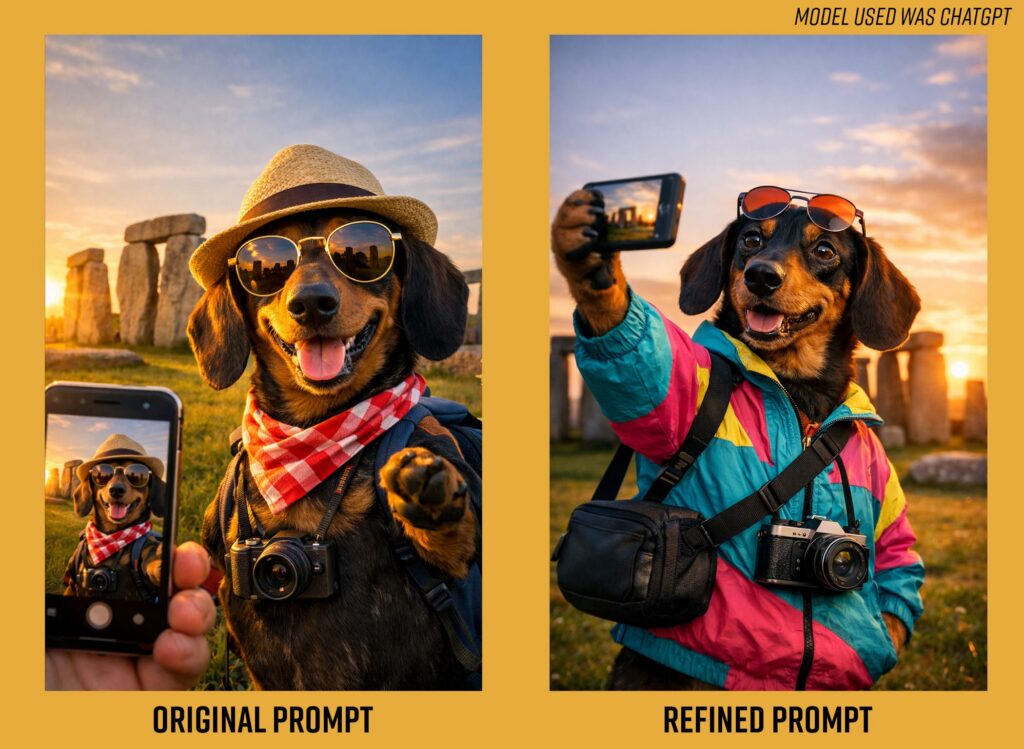
Let’s look at my simple original prompt and try to refine it to the framework below to really nail the image’s desired intent: a stylish Dachshund tourist taking a selfie at Stonehenge during golden hour
Prompts tend to work better when they move in a more intentional sequence, so we refine through this framework:
Subject + setting + composition + lighting + detail + tone
So my refined prompt looks like:
“a stylish Dachshund tourist taking a selfie at Stonehenge during golden hour, wearing a colorful windbreaker and crossbody camera bag, cinematic travel-photo composition, natural lighting, realistic fur texture, playful but believable mood”
That structure gives the model a clearer visual hierarchy. It defines what the image is, where it happens, how it should be framed, and what kind of finish you’re after.
Check out the results:
Here are a few useful prompt frameworks creatives can adapt for their own work:
FOR PHOTOREAL IMAGE GENERATION
Subject + environment + composition + lighting + surface detail + tone
FOR MOCKUPS AND BRANDED SCENES
Product or subject + user context + composition reference + brand tone + usage moment
FOR LOGO OR ICON IDEATION
Brand concept + symbol + shape language + stylistic direction + simplicity cue
FOR VIDEO AND STORYBOARD PROMPTS
Subject + action + environment + camera movement + pacing + mood
Where AI Visualization is Actually Useful
For me, the most useful part of this kind of testing wasn’t getting a perfect image on the first try. It was understanding which framework worked best for the image generator.
That’s where AI is most helpful in a creative workflow. It can help teams explore faster, test more directions early, and build stronger starting points for concepting. But it still depends on human judgment to define intent, write the prompt in the right framework, recognize quality, and know when something is visually interesting versus actually right for the brand.
That part is still ours.
AI can accelerate exploration. It can widen the field. It can even surprise you. But it works best when it stays in its proper role: as a tool that supports creative control, not a crutch that replaces it, and using it to the best of its ability is about delivering the information clearly and in the most useful order.
Bottomline Prompt Breakdown
“A stylish, adorable Dachshund tourist taking a selfie at Stonehenge during golden hour, wearing a colorful windbreaker and crossbody camera bag, cinematic travel-photo composition, natural lighting, realistic fur texture, and a playful but believable mood.”
Why it works:
- recognizable landmark
- safe, friendly subject
- enough texture and lighting complexity to reveal differences
- whimsical, but still visually aspirational
- adaptable across image, mood board, vector, and motion test
- Nearly impossible to pull off a “real” photo shoot, specifically the red tape surrounding traveling with dogs being the reason for the concept in the first place
- Budget friendly, even though we’d all like to go to Stone Henge
As a creative professional, I’m less interested in whether a model can make something impressive than whether it can make something usable. AI is useful when it expands exploration and sharpens direction, but it still needs a human to define intent, recognize quality, and decide what actually fits the brand.
Remember: You don’t always need a longer prompt. You usually need a cleaner one in the right framework.